
 Session timeout






Help
ERMR Help Page
This panel stays at the top of the page when you scroll.
Scroll
Alerts and Notifications
Select a heading below to expand/contract each section
Browsers
Some users of the QUT ERM system have found issues while using devices such as iPhones and Mac Computers with the Safari Browser.
In some cases action buttons have not appeared and pop up windows have not appeared.
The ERM Administrator recommends you use Edge or Chrome on a Windows device for the best experience with ERM.
Please use Edge or Chrome for a better experience in ERM 
Housekeeping
Each different browser you use on different device will behave differently and cache different information on each ERM page.
If you are having difficulty viewing information any of or all of these steps can help refresh your page:
- refresh the page
- log out and back in again
- clear all the cookies and cache in the browser settings
An amended 2025 version of the National Statement on Ethical Conduct in Human Research (NS)
has been released by NHMRC, with implementation of the changes to take effect at QUT, from 1st September 2025.
These changes will need to be considered by all researchers and reviewers involved in human research ethics applications.
A downloadable version of the 2025 NS and a link to FAQs that outline the major NS changes are available:
Throughout August OREI will be updating all relevant human research ethics documentation,
training, and advice on the Digital Workplace for staff and HiQ for research students.
View changes since previous approval only shows after an application has had its first Approval and has been resubmitted for an Amendment or Variation.
Search and “Open” the application for review
- Select “Review Application”
- Select the “Changes” Modal
- You can then toggle between the “last” and the “previously approved” submission and you’ll see the list of changes update.
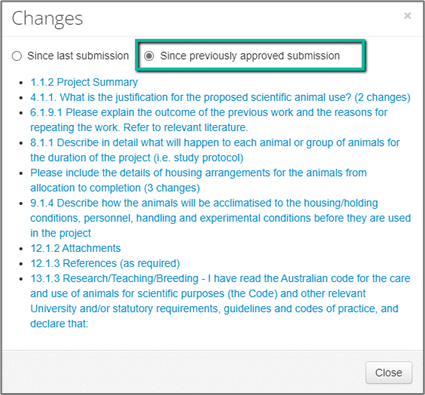
5. Select a link to navigate into the form. You’ll then see the new “View Changes” button ant the top of the page.

Alternatively, if you navigate into the form without selecting the “Changes” modal, you will have the option to select either of the “View Changes” buttons.
